 日本語
日本語
 ENGLISH
 中文簡体語
中文簡体語
 中文繁体語
中文繁体語
 한국어
한국어


2026.10.02
Do You Know Your “Actual Sleep Time”? — Visualize Your Daily Sleep with Garmin —
NEWS
Hello, everyone! This is GARMIN on the 6th floor of Mint Kobe.
Now that the weather has cooled down and it’s become easier to relax in the evenings, why not take a moment to reflect on your rest and ask yourself, “Have I been sleeping well lately?”
Actually, the amount of sleep we need isn’t “the same every day.” In this post, we’ll introduce “Sleep Coach,” a groundbreaking feature from Garmin—a smartwatch brand that’s incredibly popular at Mint Kobe!
■ Your Sleep Is "Laid Bare"!? See Your Sleep Quality at a Glance with a Dedicated App
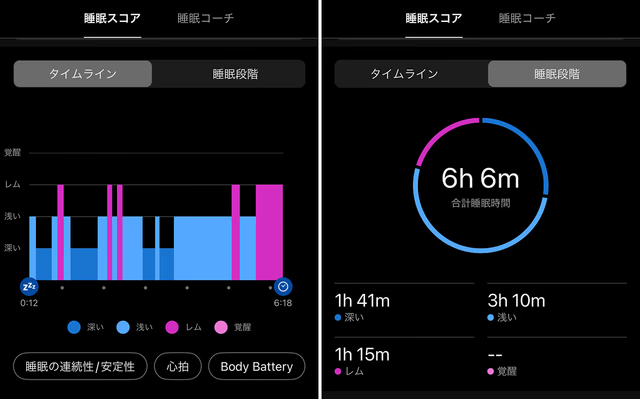
A picture is worth a thousand words! When you actually open Garmin’s dedicated app, you’ll see your sleep patterns visualized in detail, just like this. Sleep stages—such as “deep,” “light,” “REM,” and “awake”—are plotted on a color-coded timeline, making it easy to see at a glance how each stage breaks down against your total sleep time for the night. It’s really fascinating to be able to confirm with concrete data—rather than just a gut feeling—that “I actually got plenty of deep sleep last night,” isn’t it?
■ 5 Secrets Behind How Garmin’s “Sleep Coach” Determines Your Sleep Needs
Another great feature of Garmin is the “Sleep Coach” function, which uses this detailed data to tell you “how many hours of sleep you need today.” From the “Sleep Coach” tab at the top of the screen, it analyzes the following five factors to calculate the optimal amount of sleep for you each day.
1. Age (Basic Sleep Time) First, the baseline based on your age. While adults generally need 7 to 9 hours of sleep, Garmin sets a recommended baseline sleep time based on your age.
2. Daily Activity History: On days when you walk a lot or exercise, your body naturally needs more rest. The app analyzes your activity level and calories burned during the day, and automatically adds the necessary amount of sleep time on days when you’ve been active.
3. Past Sleep History There are days when you think, “I didn’t sleep very well last night…” Garmin’s Sleep Coach tracks the quality and duration of your sleep over the past few days, and if you’ve accumulated sleep debt, it increases your recommended sleep time for tonight to help you recover.
4. Naps: If you incorporate naps effectively during the day, the amount of sleep you need that night will be slightly shorter. Garmin accurately tracks your daytime naps and subtracts them from your nighttime sleep needs to provide a more accurate goal.
5. HRV (Heart Rate Variability) Status: HRV indicates the balance of the autonomic nervous system and your stress levels. If your body is under strain—not only from training fatigue but also from daily stress or alcohol consumption—the app determines that you need more sleep to recover and provides appropriate advice.
■ Why not listen to what your body is telling you? As you can see, Garmin smartwatches don’t just track your sleep—they support your daily fitness routine just like a personal coach. This is the perfect device for people who don’t exercise regularly and for busy business professionals.
We carry a wide selection of Garmin’s latest models featuring this “Sleep Coach” function. Fall is the season for sports—and for sleep. Why not come to Mint Kobe and find the perfect partner to take your lifestyle to the next level?
We sincerely look forward to welcoming you all!